
Table of Contents
You’ve probably experienced it: you find a gaming desktop with the performance you want, check the price, and realize it’s hundreds of dollars beyond your budget.
Maybe you want to play Fortnite smoothly, explore demanding AAA games, or finally upgrade from an aging computer. Whatever your goal, buying a brand-new gaming PC isn’t your only option.
A used gaming desktop can give you access to powerful graphics cards, capable processors, and upgradeable components for significantly less than some new systems.
But buying second-hand hardware comes with questions. How do you know a graphics card is working properly? Is an older processor still good enough? And how much should you actually pay?
That’s where careful research makes the difference.
In this guide, you’ll discover the best used gaming desktops for every budget in 2026, including realistic configurations to search for, examples of actual marketplace listings, and practical advice to help you avoid expensive mistakes.
Whether you’re spending $400 or more than $1,000, you’ll learn how to recognize a good gaming PC deal.
Best Used Gaming Desktops in 2026: Quick Comparison
Before choosing a particular brand, focus on the hardware inside the desktop.
A well-maintained custom gaming PC can offer better value than a newer-looking computer with weaker components.
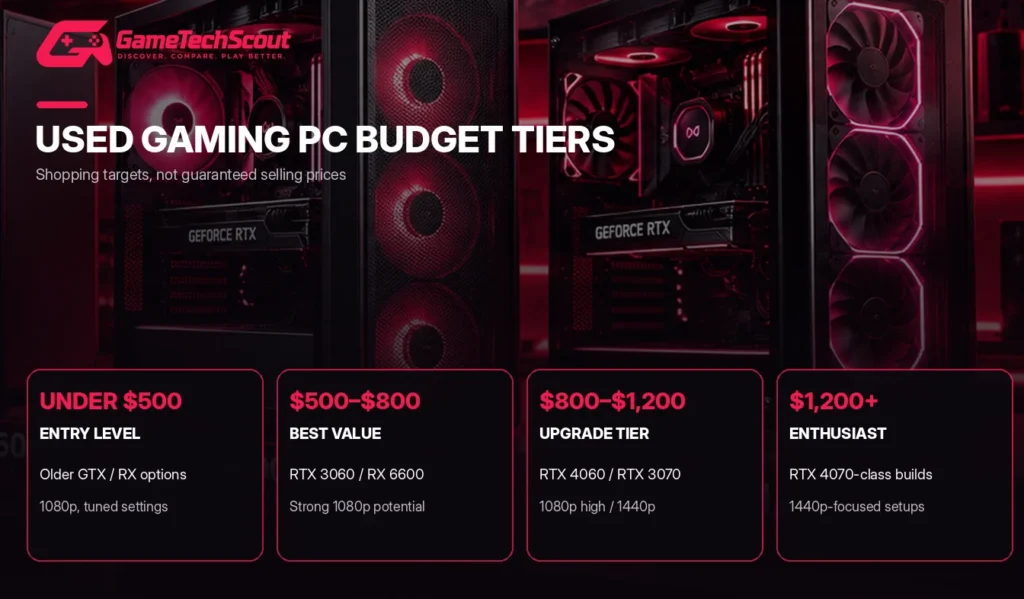
| Budget | Graphics cards to consider | Recommended RAM | Ideal gaming use |
|---|---|---|---|
| Under $500 | GTX 1660 Super, RX 6600 if available | 16GB | Entry-level 1080p |
| $500–$800 | RTX 3060, RTX 3060 Ti, RX 6600 XT | 16GB | Strong 1080p gaming |
| $800–$1,200 | RTX 4060, RTX 3070, RX 6700 XT | 16–32GB | 1080p and 1440p |
| $1,200+ | RTX 4070, RX 7800 XT or better | 32GB preferred | Higher-quality 1440p |
These are suggested shopping targets, not guaranteed market prices. Availability, processor generation, overall condition, and warranty coverage can affect what a system is worth.
Our recommended starting point: Look for a used desktop featuring an RTX 3060 or similar GPU, 16GB RAM, a capable six-core processor, and an SSD. This combination can deliver a practical balance of cost and gaming performance.
1. Best Used Gaming Desktop Under $500 — Entry-Level Gaming
You don’t need a premium computer to start enjoying PC gaming.
If your budget is below $500, focus on a functional desktop with a dedicated graphics card rather than flashy lighting or an impressive-sounding processor name.
A sensible configuration to search for includes:
- CPU: AMD Ryzen 5 3600 or a suitable newer alternative.
- GPU: GTX 1660 Super or Radeon RX 6600, depending on available deals.
- RAM: 16GB DDR4.
- Storage: At least a 500GB SSD.
- Operating system: A properly licensed, supported Windows installation.
What Games Can You Play?
This class of hardware is useful for popular games such as Valorant, Rocket League, and many other less demanding titles.
For more demanding games, you may need to reduce graphics settings to maintain smooth performance.
A Radeon RX 6600 would generally be preferable to a much weaker older graphics card when the rest of the PC and price are comparable.
What Should You Avoid?
Be particularly careful with inexpensive desktops advertised as “gaming PCs” that rely on very old office processors and entry-level graphics.
An RGB case doesn’t turn outdated hardware into a worthwhile gaming machine.
Best for: First-time PC gamers, casual players, and anyone who needs an affordable computer for both school and gaming.
2. Best Used Gaming Desktop Between $500 and $800 — Overall Value
For many buyers, this is the most interesting second-hand gaming PC price range.
You can start finding configurations with considerably stronger graphics cards, more useful storage, and processors that still handle modern games well.
HP Pavilion TG01 with RTX 3060 — A Used Desktop Worth Comparing
One US marketplace listing observed during research offered an HP Pavilion TG01 with:
| Component | Listed specification |
|---|---|
| Processor | Intel Core i5-10400F |
| Graphics | NVIDIA RTX 3060 12GB |
| RAM | 16GB |
| Storage | 1TB SSD |
| Advertised price | $540, excluding shipping |
The observed shipping charge brought the advertised total to approximately $610 before applicable taxes.
That makes the configuration interesting when compared with new entry-level gaming PCs.
The RTX 3060’s 12GB memory capacity can also be useful in games and workloads requiring more video memory.
However, the HP Pavilion’s compact design and potentially proprietary components deserve careful attention.
Potential Drawbacks
- Limited case space for graphics upgrades.
- Possible proprietary motherboard or power connections.
- Cooling and power-supply constraints.
- Condition varies between individual units.
You should confirm the exact HP model, its service documentation, and its upgrade options before buying.
Another Option: Ryzen 5 5500 with RTX 3060 Ti
A separate used listing advertised a Ryzen 5 5500 desktop featuring an RTX 3060 Ti for approximately $660 before shipping.
The RTX 3060 Ti offers stronger gaming performance than the standard RTX 3060 in many situations.
However, you’ll need to verify storage type, motherboard model, power supply, and overall condition before deciding whether the additional cost is justified.
Best for: Gamers seeking capable 1080p performance with enough headroom to enjoy demanding games at appropriate settings.
3. Best Refurbished Gaming Desktop — More Predictable Buyer Protection
Not everyone feels comfortable buying a computer directly from another gamer.
If you’re worried about hardware condition or getting stuck with a defective PC, a refurbished gaming desktop may be a better fit.
A refurbished desktop is typically inspected, cleaned, and prepared for resale by a professional seller.
However, refurbishment standards vary. Some machines receive substantial testing or replacement parts, while others receive more limited work.
Example: Refurbished RTX 3060 Desktop
One observed eBay Refurbished listing included:
- Intel Core i5-8500 processor.
- NVIDIA RTX 3060 graphics card.
- 16GB RAM.
- 512GB NVMe SSD.
- Advertised price of approximately $639.
Although that configuration includes a capable dedicated GPU, the older processor may limit performance in some CPU-intensive games compared with newer alternatives.
Its appeal comes partly from seller protections rather than raw performance alone.
Why Consider Certified Refurbished Hardware?
Under eBay’s US Refurbished program, eligible Certified Refurbished products include a two-year Allstate-serviced warranty. Other qualifying refurbished condition grades receive one year.
Eligible refurbished listings also provide a 30-day return window, subject to the program’s terms.
Don’t assume that every used desktop advertised on eBay qualifies. Look for the actual eBay Refurbished designation and check its coverage.
Best for: Buyers who value documented seller standards, clearer return options, and additional peace of mind.
4. Best Used Gaming Desktop Between $800 and $1,200 — Higher Performance
If you have more room in your budget, consider upgrading the GPU and processor rather than spending extra on RGB lighting.
At this level, you can investigate desktops featuring:
- RTX 4060 or RTX 3070 graphics.
- Radeon RX 6700 XT or comparable alternatives.
- AMD Ryzen 5 5600, Ryzen 7 5800X, or suitable Intel processors.
- 16GB to 32GB RAM.
- A 1TB SSD.
- A reliable power supply.
An observed marketplace listing included a Ryzen 7 5800X, RTX 3060 Ti, and 32GB RAM for approximately $850 before shipping.
That’s a useful configuration to compare, but a powerful processor doesn’t automatically compensate for an overpriced or poorly maintained graphics card.
Is This Enough for 1440p Gaming?
Some configurations in this category can handle 1440p gaming well, particularly with carefully chosen graphics settings.
The experience varies by game.
An RTX 3070 or RX 6700 XT generally offers more 1440p performance potential than an entry-level GPU.
Check independent benchmarks before deciding.
Best for: Players upgrading from older hardware who want more flexibility for modern games.
5. Best High-End Used Gaming Desktop Over $1,200
If your budget exceeds $1,200, you have more choices, including stronger second-hand systems and competitive brand-new gaming desktops.
You might encounter older high-end builds equipped with RTX 4070-class graphics or Radeon RX 7800 XT hardware.
These cards offer substantial 1440p gaming capability, making them appealing for enthusiasts with high-refresh-rate monitors.
However, this is also where comparing used and new becomes especially important.
When Is a High-End Used PC Worth Buying?
Look for:
- A significant saving compared with an equivalent new PC.
- Recent, capable CPU and GPU hardware.
- A recognized, high-quality power supply.
- Standard, upgrade-friendly components.
- Reliable cooling.
- Clear proof of condition and ownership.
A used PC isn’t automatically a bargain simply because it originally cost $2,000.
You should compare its actual performance and replacement cost against current hardware.
Best for: Experienced buyers who want powerful gaming hardware and understand how to inspect or upgrade PC components.
Used vs Refurbished Gaming Desktops: What’s the Difference?
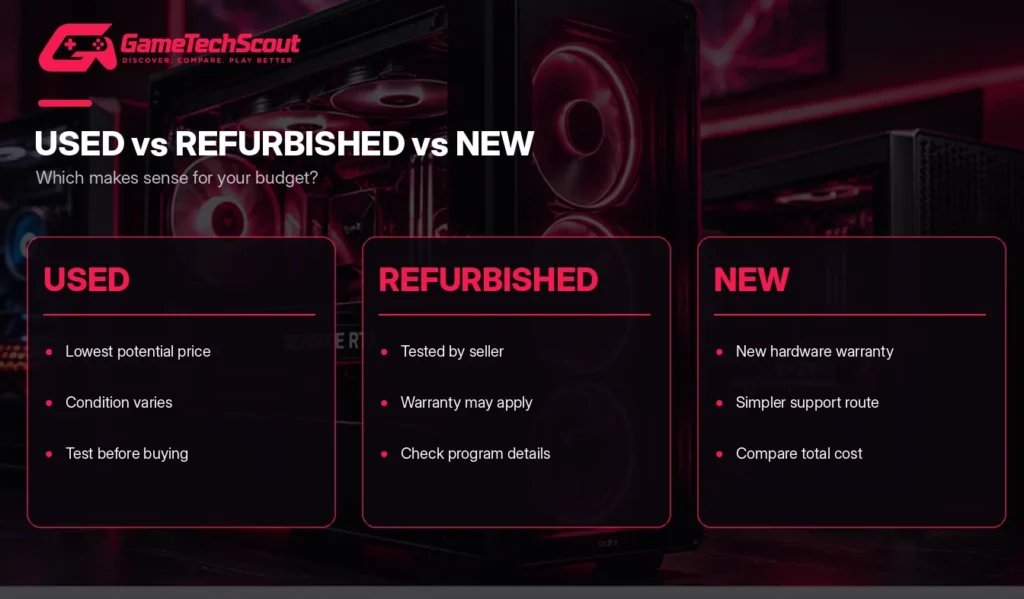
Although the terms sometimes overlap, they aren’t interchangeable.
| Feature | Used gaming desktop | Refurbished gaming desktop |
|---|---|---|
| Seller | Often an individual | Usually a professional seller |
| Inspection | Varies | Typically involves inspection or testing |
| Warranty | Often limited or absent | May include a defined warranty |
| Condition | Depends on previous use | Usually sold under a stated condition grade |
| Returns | Varies by seller and marketplace | Often more structured |
| Potential price | Sometimes lower | May include a refurbishment premium |
A private-sale PC can be an excellent purchase if you can inspect it properly.
A professionally refurbished machine may be more suitable when you want clearer purchase protections.
Neither category guarantees that the hardware will work perfectly forever.
What Specifications Should You Look for in a Used Gaming Desktop?
Graphics Card: Your First Performance Check
For gaming, the graphics card is one of the most important components.
An RTX 3060 desktop will usually provide a different gaming experience from one equipped with an entry-level GT 1030, even if both advertisements describe them as high-performance PCs.
Always request the exact GPU model and its memory capacity.
Processor: Avoid Severely Outdated CPUs
A balanced processor helps prevent unnecessary performance limitations.
For modern gaming, six-core processors such as the Ryzen 5 5600 or Core i5-11400F remain useful reference points.
Older CPUs can still perform adequately, but investigate Windows 11 support, motherboard limitations, and game requirements.
RAM and SSD Storage
Aim for at least 16GB RAM when possible.
For storage, prioritize an SSD over an HDD-only configuration.
A 500GB SSD is a practical minimum, while 1TB provides more room for larger game installations.
Power Supply and Upgradeability
Don’t overlook the power supply simply because the graphics card looks impressive.
Ask for the PSU manufacturer, exact model, wattage, and connector information.
A poor-quality power supply can create stability and reliability problems.
Also check whether the motherboard, case, and cooling components are compatible with future upgrades.
Used Gaming PC Performance: What Can You Expect?
Independent benchmarks provide a better starting point than seller claims such as “runs every game on ultra.”
Tom’s Hardware’s June 2026 GPU hierarchy reports the following 1080p Ultra results:
| Graphics card | 1080p Ultra benchmark average |
|---|---|
| Radeon RX 6600 | 51.9 FPS |
| GeForce RTX 3060 12GB | 61.5 FPS |
| GeForce RTX 3060 Ti | 74.2 FPS |
| GeForce RTX 4060 | 71.5 FPS |
| GeForce RTX 3070 | 87.2 FPS |
Source: Tom’s Hardware GPU Benchmarks Hierarchy, June 2026. These are multi-game averages under the publication’s specific test conditions, not guaranteed results for an individual used desktop.
A desktop’s actual performance also depends on its CPU, RAM configuration, thermals, game settings, and maintenance history.
Use benchmark results to understand relative GPU performance, not to assume that every second-hand PC delivers exactly the same FPS.
How to Inspect a Used Gaming Desktop Before Buying
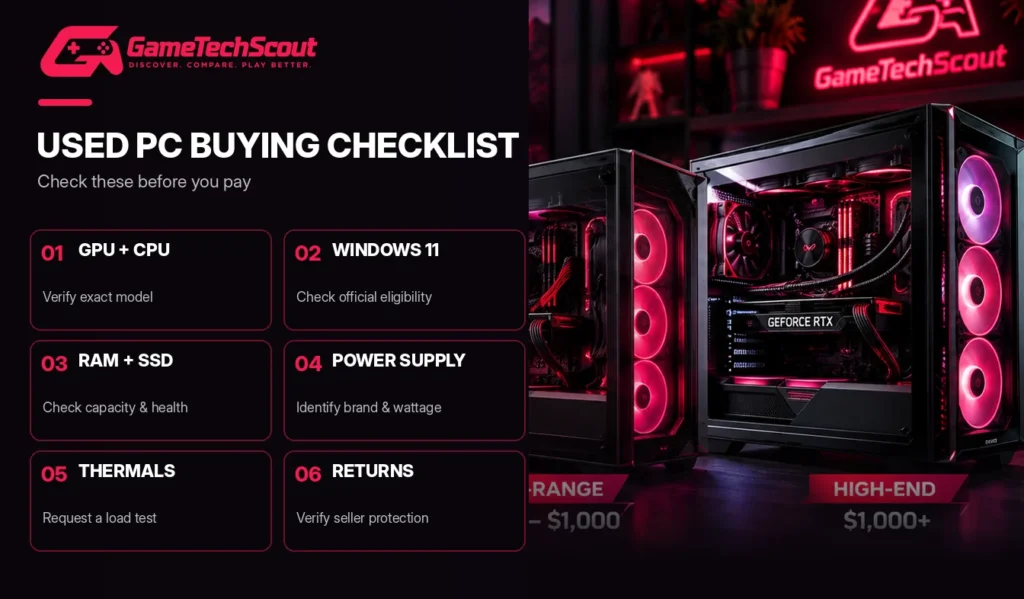
A good-looking PC case doesn’t tell you whether the components are healthy.
Use this checklist before handing over your money.
Verify the Hardware
Ask the seller to show the actual CPU, GPU, RAM, and storage details.
You can verify these with Windows System Information and reputable diagnostic applications such as CPU-Z or GPU-Z.
Check that the components match the advertisement.
Test Temperatures and Stability
Whenever practical, ask to see the computer running a demanding game or a reputable benchmark.
Pay attention to:
- Unexpected shutdowns.
- Display artifacts.
- Unusual fan noise.
- Excessively high temperatures.
- Repeated crashes.
- Performance far below comparable systems.
If the seller won’t allow any meaningful verification, consider another listing.
Check Windows 11 Compatibility
Windows 10 reached the end of standard support on October 14, 2025.
Microsoft’s Windows 11 requirements include a supported processor, TPM 2.0, and UEFI Secure Boot capability.
Don’t assume an old gaming PC is officially compatible simply because the seller installed Windows 11.
Use Microsoft’s PC Health Check application or request proof of eligibility.
Inspect the Physical Condition
Look for excessive dust, damaged ports, corrosion, broken case panels, and signs of overheating.
Check the GPU fans and cooling system.
For shipped desktops, ask how the graphics card will be protected during transportation.
Heavy GPUs can place stress on the motherboard or PCIe slot if the PC is packaged poorly.
Where to Buy Used Gaming Desktops in 2026
eBay
eBay offers a broad selection of used and refurbished computers.
Pay attention to seller feedback, product photographs, return eligibility, and whether the listing belongs to the formal Refurbished program.
Browse used RTX gaming desktops on eBay
Newegg
Newegg lists gaming desktops across new, refurbished, and recertified categories.
Read product descriptions carefully and distinguish marketplace sellers from direct retailer sales.
Explore refurbished gaming desktop listings on Newegg
Back Market
Back Market offers professionally refurbished electronics.
Its US policy describes a one-year limited seller warranty and a 30-day return period for qualifying purchases.
Check whether the specific gaming desktop configuration you want is actually available.
Local Sellers
Buying locally may let you inspect and test the computer before paying.
Choose a safe public meeting arrangement where a powered-on demonstration is possible, and don’t transfer money in advance to an unfamiliar seller.
Keep records of the sale and verify the actual components.
Common Mistakes When Buying a Second-Hand Gaming PC
Avoid these problems:
- Overpaying for an old processor. A higher-tier name doesn’t make an outdated CPU competitive with newer hardware.
- Ignoring the graphics card. A strong CPU paired with a weak GPU can disappoint in games.
- Buying without testing. Cosmetic condition alone proves very little.
- Forgetting Windows compatibility. An unsupported operating system can become a long-term problem.
- Trusting cheap power supplies. Unknown PSU quality is a reason to investigate further.
- Overlooking shipping and taxes. Compare the final delivered cost.
- Ignoring upgrade restrictions. Some prebuilt desktops use proprietary parts or limited cooling.
- Assuming refurbished always means like new. Read the actual condition grade and warranty terms.
Frequently Asked Questions About Used Gaming Desktops
What Is the Best Used Gaming Desktop in 2026?
A desktop with an RTX 3060 or comparable GPU, a capable six-core processor, 16GB RAM, and an SSD is a sensible starting point for many budget gamers. The best choice depends on price and condition.
Is Buying a Used Gaming Desktop Worth It?
Yes, when you save enough compared with equivalent new hardware and can verify that the system is working properly.
Can You Buy a Good Used Gaming Desktop Under $500?
It’s possible, especially for entry-level 1080p gaming. Prioritize a functional dedicated GPU, 16GB RAM, an SSD, and officially supported software.
Is an RTX 3060 Still Good for Gaming in 2026?
Yes. Independent 2026 benchmarks show that it remains capable for 1080p gaming, although modern demanding games may require adjusted settings.
What Is the Difference Between Used and Refurbished Gaming PCs?
A used PC is typically resold in its existing condition, while a refurbished PC usually goes through some professional inspection or preparation. Refurbished models may offer better warranty protection.
How Long Can a Used Gaming Desktop Last?
There is no guaranteed lifespan. Reliability depends on component age, operating temperatures, prior use, manufacturing quality, and maintenance.
Should You Buy a Used Gaming Desktop or Build Your Own?
Buying used can reduce your initial costs. Building your own gives you more control over individual components, warranty coverage, and future upgrades.
What Should You Test Before Buying a Used Gaming PC?
Verify the CPU and GPU, test gaming performance, inspect temperatures, check storage health, confirm Windows compatibility, and review the seller’s return terms.
Conclusion: Find the Best Used Gaming Desktop for Your Budget
Buying a second-hand gaming computer can be one of the smartest ways to get into PC gaming without paying full price for new hardware.
Under $500, focus on dependable entry-level performance. Between $500 and $800, RTX 3060 and RTX 3060 Ti desktops can offer compelling value. With a larger budget, stronger graphics cards and newer processors become increasingly attractive.
But don’t let a low asking price distract you from the condition of the hardware.
The best used gaming desktop is one that delivers the gaming performance you need at a fair price, without exposing you to unnecessary purchasing risk.
Before buying, compare specifications, verify the seller’s claims, and calculate the total delivered cost.
Ready to find your next gaming PC? Browse current used and refurbished desktop listings, shortlist two or three configurations, and compare their graphics cards, processors, warranty protection, and upgrade options.
Have a particular desktop in mind? Share its specifications and asking price in the GameTechScout comments. Your comparison might help another gamer avoid an expensive mistake.
GameTechScout — Discover. Compare. Play Better.
Editorial disclosure: This article is based on independent benchmark data, marketplace observations, and published warranty policies. GameTechScout has not personally tested the specific used desktops discussed here. Listings, prices, availability, and conditions can change.