

Table of Contents
You’ve finally decided to upgrade to a powerful gaming laptop. You’ve watched gameplay benchmarks, compared graphics cards, and imagined playing your favorite games at maximum settings without worrying about performance.Then you start shopping.One laptop costs $3,000. Another costs nearly $5,000. Both advertise NVIDIA RTX graphics, beautiful displays, and exceptional gaming performance. So what exactly are you paying extra for? Choosing the best high end gaming laptop isn’t simply about buying the most expensive computer available. The right machine should deliver excellent gaming performance, a display you’ll enjoy, dependable cooling, and enough useful features to justify its premium price.
In 2026, gaming laptops equipped with NVIDIA RTX 5080 and RTX 5090 graphics offer impressive capabilities. But their real-world performance varies considerably depending on cooling, power limits, processors, and design.
Whether you’re a competitive gamer, content creator, or someone who wants desktop-level gaming performance in a portable machine, this guide will help you understand your options.
We’ll compare six premium gaming laptops, explain their advantages and drawbacks, and help you decide which specifications deserve your money.
Best High-End Gaming Laptops in 2026: Quick Comparison
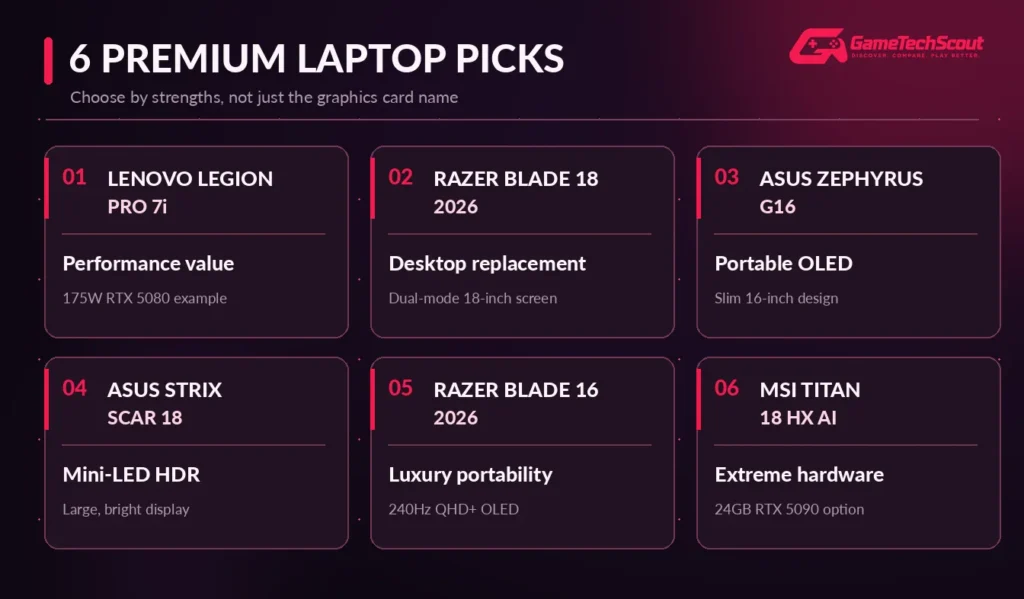
Before exploring individual models, consider what matters most: maximum performance, display quality, portability, or value.
| Gaming laptop | GPU configuration | Display highlight | Best for |
|---|---|---|---|
| Lenovo Legion Pro 7i Gen 10 | RTX 5080 | 16-inch OLED, 240Hz | Performance and value |
| Razer Blade 18 (2026) | RTX 5090 | 18-inch dual-mode display | Desktop replacement |
| ASUS ROG Zephyrus G16 (2026) | RTX 5080 | 16-inch OLED, 240Hz | Premium portability |
| ASUS ROG Strix SCAR 18 (2026) | RTX 5090 | 18-inch Mini-LED | Immersive HDR gaming |
| Razer Blade 16 (2026) | RTX 5090 | 16-inch OLED, 240Hz | Luxury gaming design |
| MSI Titan 18 HX AI | RTX 5090 | 18-inch UHD+ Mini-LED | Extreme hardware |
Specifications refer to selected manufacturer or independently reviewed configurations. Hardware options, availability, and prices vary.
Our starting recommendation: Consider the Lenovo Legion Pro 7i with RTX 5080 if you want powerful gaming performance without automatically paying the highest RTX 5090 premium.
Choose one of the larger 18-inch machines if maximum performance and display size matter more than portability.
1. Lenovo Legion Pro 7i — Best High-End Gaming Laptop for Performance and Value
The Lenovo Legion Pro 7i Gen 10 is one of the most compelling premium gaming laptops to consider in 2026.
It combines powerful hardware with a design that prioritizes sustained gaming performance rather than simply looking thin or luxurious.
A documented configuration includes an Intel Core Ultra 9 processor, an NVIDIA RTX 5080 Laptop GPU rated at 175W, and a 16-inch OLED display with a 240Hz refresh rate.
Why Is the Legion Pro 7i So Competitive?
Cooling and power delivery are among its biggest advantages.
Its relatively substantial chassis gives the processor and graphics card more opportunity to sustain demanding workloads.
In PC Gamer’s 2026 comparisons, an RTX 5080 Legion Pro 7i remained remarkably competitive against premium RTX 5090 laptops.
That’s particularly important when you’re deciding whether to spend significantly more for the highest GPU tier.
The Legion also offers accessible memory and storage configurations on supported models.
Advantages:
- Excellent sustained gaming performance.
- High-power RTX 5080 configuration.
- Sharp 240Hz OLED display.
- Strong processor performance.
- Useful storage and memory upgrade options.
Drawbacks:
- Bulkier than slim premium laptops.
- Fan noise can become noticeable.
- Limited gaming endurance away from the charger.
- Exact configurations vary by market.
Who Should Buy the Legion Pro 7i?
Choose it if raw performance, a high-quality display, and balanced value matter more than owning the thinnest machine.
It is especially appealing for demanding 1440p or 1600p gaming.
2. Razer Blade 18 (2026) — Best Desktop-Replacement Gaming Laptop
If you want a gaming laptop that behaves more like a portable desktop workstation, the Razer Blade 18 deserves attention.
The 2026 configuration reviewed by Tom’s Hardware included an Intel Core Ultra 9 290HX Plus processor, an RTX 5090 Laptop GPU with 24GB GDDR7 memory, 32GB RAM, and a 2TB SSD.
Its most distinctive feature is its enormous 18-inch dual-mode display.
4K Gaming or Maximum Refresh Rate?
The Blade 18 lets you switch between two display modes:
| Display mode | Resolution | Refresh rate |
|---|---|---|
| High-resolution | 3840 × 2400 | 240Hz |
| High-refresh | 1920 × 1200 | 440Hz |
That gives you flexibility.
You can enjoy detailed visuals in cinematic games and switch to a lower resolution with a higher refresh rate for competitive titles.
However, using a 240Hz display doesn’t mean demanding 4K games will always run at 240 FPS.
Gaming Performance and Design
Independent reviewers praised the Blade 18’s strong performance and broad connectivity.
The 2026 model includes Thunderbolt connections, HDMI, Ethernet, and an SD card reader.
But premium hardware has its compromises.
Tom’s Hardware reported considerable heat and fan noise. The reviewed RTX 5090 configuration also carried a price of approximately $5,399 at the time of testing.
Advantages:
- Extremely powerful RTX 5090 configuration.
- Large dual-mode display.
- Strong gaming and creative performance.
- Premium aluminum construction.
- Extensive connectivity.
Drawbacks:
- Very expensive.
- Weighs approximately 3.2kg.
- Can run hot and loud.
- Not ideal for frequent travel.
Best for: Enthusiast gamers and creators who want one machine for demanding games, rendering, editing, and desktop-style use.
3. ASUS ROG Zephyrus G16 (2026) — Best Premium Gaming Laptop for Portability
A high-end gaming laptop doesn’t have to be enormous.
The ASUS ROG Zephyrus G16 is designed for gamers who want excellent hardware in a relatively slim machine.
The 2026 model features configurations with an Intel Core Ultra 9 386H processor and up to an RTX 5080 Laptop GPU on ASUS’s featured US configuration.
Its aluminum chassis measures approximately 0.70 inches thick and weighs around 4.3 pounds.
OLED Display and Gaming Performance
The Zephyrus G16 features a 16-inch 2.5K OLED display with a 240Hz refresh rate.
OLED technology provides exceptionally deep blacks and fast pixel transitions, making it attractive for story-driven games and competitive titles alike.
The trade-off is power.
The RTX 5080 configuration is documented at up to 135W in Turbo mode, with higher settings possible in supported manual modes.
That means you shouldn’t expect it to perform exactly like a thicker gaming laptop with a 175W RTX 5080.
Advantages:
- Relatively slim and portable design.
- Beautiful 240Hz OLED display.
- Powerful RTX 5080 options.
- Premium aluminum construction.
- Suitable for productivity and creative work.
Drawbacks:
- Lower standard GPU power limit than some larger competitors.
- Expensive for its performance category.
- Limited cooling space.
- Upgrade options depend on configuration.
ASUS advertised a US configuration at approximately $3,699.99 during October 2026 research, although prices can change.
Best for: Students, traveling professionals, and gamers who want premium graphics without carrying a large desktop-replacement laptop.
4. ASUS ROG Strix SCAR 18 (2026) — Best for Immersive HDR Gaming
If screen quality is one of your biggest priorities, the ASUS ROG Strix SCAR 18 is worth investigating.
This large gaming laptop combines high-end hardware with an 18-inch Mini-LED display.
Certain 2026 configurations feature the Intel Core Ultra 9 290HX Plus and NVIDIA RTX 5090 graphics.
Why Choose Mini-LED?
Mini-LED monitors use many small backlighting zones to improve brightness and contrast.
Unlike OLED, Mini-LED still relies on an LCD panel, but a well-implemented system can provide striking HDR presentation.
The SCAR 18’s display is particularly appealing for visually demanding games, detailed environments, and colorful cinematic effects.
Performance and Important Limitations
The laptop delivers substantial processing and graphics performance.
However, Tom’s Hardware’s review identified limitations in the tested RTX 5090 configuration, including its memory configuration and storage choices relative to the premium asking price.
The reviewed RTX 5090 model was priced around $4,999.99, while the RTX 5080 version was listed around $4,299.99.
Advantages:
- Large immersive Mini-LED display.
- Powerful RTX 5090 option.
- High-end processor.
- Dedicated gaming features.
- More room for cooling than thin laptops.
Drawbacks:
- Large and heavy.
- High purchase price.
- Configuration-specific performance compromises.
- Fan noise under demanding workloads.
Best for: Gamers who prioritize large-screen immersion, excellent HDR presentation, and premium gaming hardware.
5. Razer Blade 16 (2026) — Best Luxury Gaming Laptop
The Razer Blade 16 targets a different kind of high-end buyer.
You want premium build quality and serious gaming hardware, but you don’t want a machine that looks or feels like a bulky workstation.
Razer’s 2026 Blade 16 combines a relatively compact aluminum design with high-performance graphics options, including the RTX 5090.
Selected configurations offer an Intel Core Ultra 9 386H processor, 64GB memory, 2TB storage, and a 16-inch QHD+ OLED display running at 240Hz.
Is the RTX 5090 Worth It in a Thin Laptop?
The Blade 16 demonstrates why specifications alone don’t tell the complete story.
In PC Gamer’s testing, the 2026 Blade 16 delivered excellent performance, but the thicker Lenovo Legion Pro 7i with an RTX 5080 matched or exceeded it in several gaming benchmarks.
That doesn’t make the Blade a bad machine.
Instead, it illustrates the premium you may pay for compact design, materials, and portability.
Advantages:
- Premium aluminum construction.
- Excellent QHD+ OLED display.
- Powerful RTX 5090 option.
- More portable than 18-inch competitors.
- Suitable for gaming and content creation.
Drawbacks:
- Expensive.
- Compact chassis can limit sustained performance relative to larger machines.
- Fans and heat remain considerations.
- Some configurations have limited memory upgrade flexibility.
Best for: Buyers who want luxury construction, strong gaming performance, and a more portable form factor.
6. MSI Titan 18 HX AI — Best for Extreme Hardware and Expandability
Sometimes you don’t want a balanced gaming laptop.
You want the biggest specifications, extensive hardware options, and a machine built around maximum performance.
That’s the territory of the MSI Titan 18 HX AI.
The A2XW series offers Intel Core Ultra 200HX processors and RTX 5090 configurations with 24GB GDDR7 graphics memory.
MSI lists up to 175W graphics power and a combined CPU/GPU power capability reaching 270W under supported conditions.
Why Consider the MSI Titan?
The Titan is built around a large 18-inch chassis, advanced cooling, substantial storage options, and a premium keyboard.
Certain configurations feature a 3840 × 2400 Mini-LED display with a 120Hz refresh rate.
This makes the machine suitable for gamers who also work with demanding creative applications.
Advantages:
- Extremely powerful CPU and GPU configurations.
- Large high-resolution display options.
- Extensive storage and memory capabilities.
- Strong connectivity.
- Mechanical keyboard options.
Drawbacks:
- Extremely high price.
- Heavy construction and substantial charger.
- Limited portability.
- More hardware than most gamers need.
Best for: Enthusiasts, content creators, and users who need a desktop-replacement system with exceptional hardware capacity.
What Makes a High-End Gaming Laptop Worth the Money?
A premium gaming laptop should deliver more than impressive RGB lighting or a recognizable brand name.
Several components determine whether the machine provides meaningful value.
Graphics Card: RTX 5080 vs RTX 5090
The graphics card is central to gaming performance.
NVIDIA’s current RTX 50-series laptop specifications include:
| Specification | RTX 5080 Laptop | RTX 5090 Laptop |
|---|---|---|
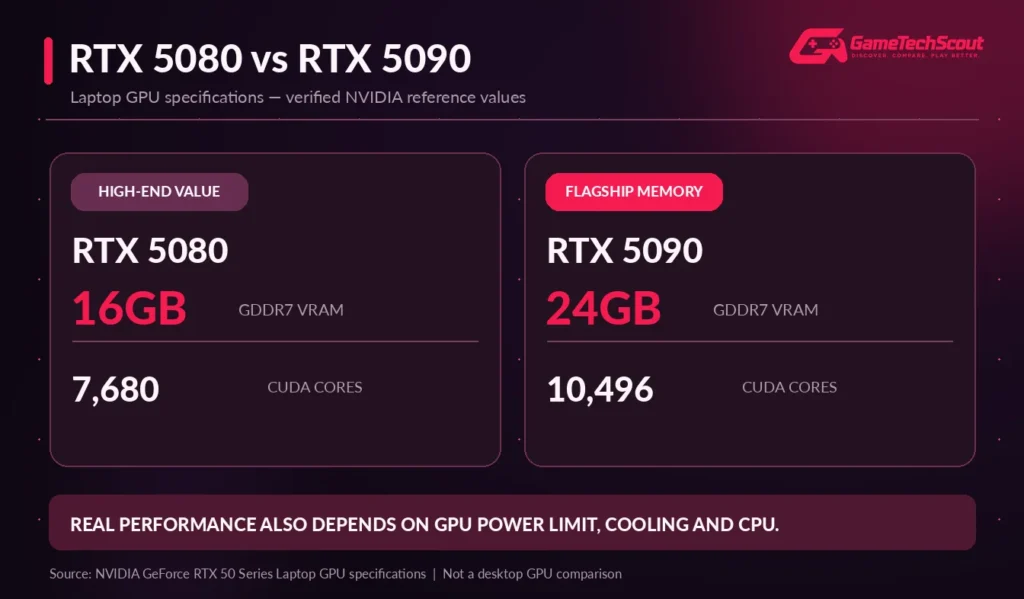
| CUDA cores | 7,680 | 10,496 |
| Video memory | 16GB GDDR7 | 24GB GDDR7 |
| Architecture | Blackwell | Blackwell |
| DLSS and supported frame generation | Yes | Yes |
The RTX 5090 offers additional processing resources and memory capacity.
However, a laptop RTX 5090 is not equivalent to the desktop RTX 5090 simply because they share a name.
Does GPU Wattage Matter?
Absolutely.
Laptop manufacturers configure graphics hardware at different power limits.
A thinner RTX 5090 laptop can perform differently from a thicker machine using the same GPU.
Cooling also determines how long a GPU can maintain its performance.
One striking example comes from PC Gamer’s 2026 testing of Metro Exodus Enhanced Edition at native resolution using Ultra settings:
| Tested gaming laptop | GPU | Average FPS |
|---|---|---|
| Razer Blade 16 (2026) | RTX 5090 | 95 |
| Lenovo Legion Pro 7i Gen 10 | RTX 5080 | 96 |
These are results from one test under that publication’s specific conditions, not a universal ranking of the two GPUs.
They demonstrate why you should investigate independent benchmarks for the exact laptop configuration before purchasing.
Processor: Don’t Overspend Without a Reason
Premium gaming laptops commonly use processors such as Intel Core Ultra 9 or capable AMD Ryzen 9 chips.
A strong processor is especially useful for CPU-heavy games, streaming, rendering, and intensive multitasking.
However, paying for the highest CPU tier doesn’t always provide a proportional increase in gaming performance.
Consider the games and applications you actually run.
RAM and Storage: 32GB Is a Practical Target
For a new high-end gaming laptop, 32GB RAM is a sensible target.
It provides room for modern gaming, streaming, background applications, and many creative workflows.
If you regularly work with large video projects or demanding development applications, additional memory may be useful.
For storage, start with 1TB, but 2TB is often more convenient at this price level.
Always verify whether RAM is soldered and whether the SSD can be upgraded.
OLED vs Mini-LED: Which Display Should You Choose?
A premium display can make a noticeable difference in your gaming experience.
OLED Gaming Laptop Displays
OLED provides deep blacks, exceptional contrast, and extremely fast pixel transitions.
It’s particularly attractive for immersive games and fast motion.
However, OLED panels can be susceptible to burn-in over prolonged periods of static content. Check warranty coverage and panel-protection features.
Mini-LED Gaming Laptop Displays
Mini-LED is a backlighting technology that can deliver high brightness and strong HDR performance.
It is useful in brighter rooms and for users who want a high-impact display without the same burn-in considerations.
However, local dimming can produce visible blooming around bright objects.
Our recommendation: Choose OLED for outstanding contrast and motion clarity. Consider Mini-LED when brightness, large-screen HDR, and mixed workloads are your priorities.
How Much Should You Spend on a High-End Gaming Laptop?
Premium gaming laptop prices vary considerably.
| Shopping budget | What to investigate |
|---|---|
| $2,000–$3,000 | Discounted high-performance configurations and upper-midrange models |
| $3,000–$4,000 | RTX 5080 laptops, premium OLED displays, slim flagship designs |
| $4,000–$5,000 | High-spec RTX 5090 systems and large-screen models |
| $5,000+ | Extreme desktop replacements and specialized workstation-style configurations |
These are approximate shopping bands, not guaranteed current retail prices.
A machine priced at $5,000 isn’t automatically twice as fast as a $2,500 gaming laptop.
Before paying more, compare the actual benchmark improvement, build quality, display, support, and useful features.
What to Check Before Buying a Premium Gaming Laptop
A premium price shouldn’t prevent you from inspecting the details.
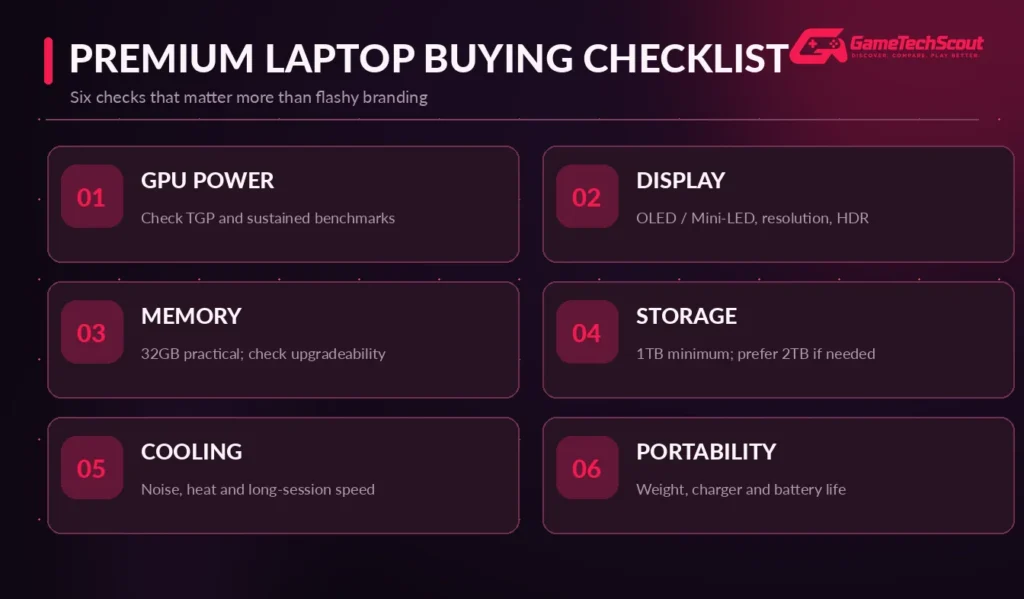
Use this checklist:
- GPU power limit: Check TGP and independently measured gaming performance.
- Display: Compare resolution, refresh rate, HDR quality, and panel technology.
- Memory: Aim for 32GB and verify upgradeability.
- Storage: Choose enough SSD space for your games and creative files.
- Cooling: Review fan noise, sustained performance, and surface temperatures.
- Portability: Consider weight, charger size, battery life, and your travel habits.
- Warranty: Check repair support and display coverage.
Are High-End Gaming Laptops Good on Battery?
Premium components can consume substantial amounts of power during gaming.
Even when a high-end laptop delivers respectable battery life during light productivity tasks, demanding games typically drain the battery quickly.
Performance may also decrease away from the charger.
If you regularly travel, pay attention to measured productivity battery life rather than assuming a large battery guarantees long gaming sessions.
Common Mistakes to Avoid
When spending thousands of dollars, small purchasing mistakes become expensive.
Buying the highest GPU tier automatically: An RTX 5080 configuration may offer better value than an RTX 5090 model.
Ignoring cooling: Sustained performance matters more than a short benchmark burst.
Overlooking screen quality: The display is one of the main features you’ll experience every day.
Assuming all 2026 models are identical: Hardware configurations vary by region and model number.
Forgetting upgrade limitations: Some premium thin laptops use soldered memory.
Ignoring the total setup cost: You may also need a gaming mouse, headset, external storage, or monitor.
Frequently Asked Questions About High-End Gaming Laptops
What Is the Best High End Gaming Laptop in 2026?
The Lenovo Legion Pro 7i is a compelling performance-focused choice, while the Razer Blade 18 offers exceptional desktop-replacement capabilities. The ASUS Zephyrus G16 is especially attractive if you value portability.
Is an RTX 5090 Gaming Laptop Worth Buying?
It can be if you need maximum GPU performance or 24GB VRAM for memory-intensive workloads. For many gamers, an RTX 5080 laptop offers a more balanced purchase.
Can High-End Gaming Laptops Run Games at 4K?
Yes, suitably configured premium laptops can handle demanding 4K gaming. Performance depends on the game, settings, cooling, and whether supported upscaling is enabled.
Is 32GB RAM Enough for a Premium Gaming Laptop?
For most demanding gaming and multitasking workloads, 32GB is a practical amount. Some professional applications benefit from 64GB or more.
Are High-End Gaming Laptops Better Than Desktops?
Not necessarily. Desktops often provide better upgradeability and sustained performance for the price. High-end gaming laptops are valuable when portability is important.
Is a 16-Inch or 18-Inch Gaming Laptop Better?
A 16-inch model is generally more convenient to carry. An 18-inch laptop offers a larger display and may have more cooling capacity, but is heavier.
How Long Does a High-End Gaming Laptop Last?
A well-maintained laptop can remain useful for years. Its gaming relevance depends on evolving game requirements, your performance expectations, component reliability, and available upgrades.
Conclusion: Which High-End Gaming Laptop Should You Buy?
A premium gaming laptop should give you an experience that justifies its price.
For most performance-focused enthusiasts, the Lenovo Legion Pro 7i with RTX 5080 deserves serious consideration. It proves that good cooling and sustained performance can matter more than owning the highest graphics card tier.
If you want a massive screen and exceptional hardware, consider the Razer Blade 18 or ASUS ROG Strix SCAR 18.
If portability matters, the ASUS ROG Zephyrus G16 or Razer Blade 16 offers a more travel-friendly approach.
And if you want extreme hardware without prioritizing price or weight, the MSI Titan 18 HX AI is a powerful desktop-replacement option.
Before you buy, choose your preferred screen size, set your maximum budget, and compare the exact configurations of your top two laptops.
Check independent benchmarks, review the warranty, and think carefully about whether you’ll use the premium features you’re paying for.
Which high-end gaming laptop would you choose? Share your favorite model, budget, and preferred games in the GameTechScout comments.
GameTechScout — Discover. Compare. Play Better.
Editorial disclosure: This guide is based on published manufacturer specifications and independent third-party reviews. GameTechScout has not personally tested all the models discussed. Specifications, prices, discounts, and availability can change.

2 Comments