

Table of Contents
You’ve finally saved $500 for a gaming laptop. You’re excited to play your favorite PC games, but every decent-looking machine seems to cost $800, $1,000, or even more. You find a laptop advertised as “perfect for gaming” at $399. The pictures look impressive, but the specifications tell another story: basic integrated graphics, limited memory, and a processor that might struggle with demanding games. So, can you actually buy a cheap gaming laptop under $500 that delivers an enjoyable gaming experience?
This GameTechScout guide compares five gaming laptop families, explains what they can realistically handle, and shows you how to spot a worthwhile deal.
In 2026, your strongest options at this price are usually refurbished, used, or open-box gaming laptops. Older machines equipped with NVIDIA GeForce RTX 3050 graphics can provide a better gaming experience than some newer laptops with less powerful integrated graphics.
The challenge is knowing which hardware to look for, which compromises are acceptable, and how to avoid spending your entire budget on a disappointing purchase.
Best Cheap Gaming Laptops Under $500: Quick Comparison
Before choosing a laptop, focus on its exact hardware configuration and condition rather than the brand name.
| Laptop | Graphics to target | Best for | Main drawback |
|---|---|---|---|
| HP Victus 15 | RTX 3050 6GB | Best starting point | Often only 8GB RAM |
| Lenovo IdeaPad Gaming 3 | RTX 3050 4GB | Balanced used option | Older hardware |
| Acer Nitro 5 | RTX 3050 4GB | Everyday 1080p gaming | Weight and cooling |
| ASUS TUF Gaming F15 | RTX 3050 4GB | Used gaming alternative | Display and battery vary |
| MSI GF63 Thin | RTX 3050 4GB | Portability | Lower GPU power limit |
These are recommendations to investigate when priced at $500 or less. Availability changes quickly, particularly for older gaming laptops.
Our Quick Recommendation
Start by searching for an HP Victus 15 with an RTX 3050, ideally the 6GB GPU version.
If you cannot find one in good condition within your budget, compare older Lenovo IdeaPad Gaming 3 and Acer Nitro 5 configurations.
Don’t pay $500 for a laptop simply because it has an RGB keyboard or the word “gaming” in its product title.
1. HP Victus 15 — Best Overall Laptop to Watch Under $500
The HP Victus 15 is one of the strongest candidates when shopping for a refurbished gaming laptop on a limited budget.
A particularly interesting configuration is the Victus 15-fa1093dx, which combines an Intel Core i5-13420H processor with an RTX 3050 Laptop GPU featuring 6GB dedicated graphics memory.
According to HP’s official Victus specifications, the Victus 15-fa family includes several graphics options, so checking the exact model number is essential.
What Makes This HP Victus Attractive?
The 15-fa1093dx configuration includes:
- Intel Core i5-13420H processor.
- NVIDIA RTX 3050 Laptop GPU with 6GB GDDR6.
- 8GB DDR4 RAM.
- 512GB NVMe SSD.
- 15.6-inch Full HD display with a 144Hz refresh rate.
This hardware provides a useful starting point for esports and less demanding PC games.
Its dedicated GPU also gives you more graphical flexibility than many inexpensive general-purpose laptops.
During recent research, some open-box and refurbished Victus listings appeared close to $500, although availability and prices varied.
Advantages
- Dedicated RTX graphics.
- Useful 1080p gaming capability.
- 144Hz display in the referenced configuration.
- Practical SSD capacity.
- Straightforward design suitable for school or everyday work.
Drawbacks
- Only 8GB RAM in some configurations.
- Modest screen brightness and color coverage.
- Battery endurance may be limited during gaming.
- Affordable stock can disappear quickly.
Should You Buy an 8GB HP Victus?
It depends on your final budget.
If the laptop costs $450 and upgrading to 16GB is affordable, it might be worth considering.
But if the machine costs $499 and requires an immediate memory upgrade, your real cost will exceed the advertised price.
Best for: Buyers who want a dedicated RTX GPU while staying close to the $500 limit.
2. Lenovo IdeaPad Gaming 3 — Best Balanced Used Gaming Laptop
If you can’t find a suitable HP Victus, the Lenovo IdeaPad Gaming 3 is another useful model family to investigate.
Older IdeaPad Gaming 3 configurations offered AMD Ryzen processors and NVIDIA GTX or RTX graphics.
According to Lenovo’s IdeaPad Gaming 3 specifications, the 15ACH6 family includes RTX 3050 variants with 4GB graphics memory and a documented 85W GPU configuration.
Why Consider the Lenovo IdeaPad Gaming 3?
Lenovo designed this laptop family around practical gaming hardware rather than luxury construction.
Depending on the version, you may find:
- Ryzen 5 or Ryzen 7 processors.
- GTX 1650, RTX 2050, or RTX 3050 graphics.
- Full HD gaming displays.
- DDR4 memory with two available slots.
- SSD upgrade possibilities.
The exact graphics card matters enormously.
An RTX 3050 version may be attractive at the right price, but a similarly named IdeaPad Gaming 3 with a GTX 1650 should be evaluated differently.
Advantages
- Gaming-focused hardware.
- Useful upgrade potential.
- Dedicated graphics options.
- Good alternative when refurbished stock is available.
Drawbacks
- Older CPU and GPU generations.
- Used batteries may be worn.
- Specifications differ widely.
- Some machines may have experienced years of heavy gaming use.
Best for: Buyers who want a capable older gaming laptop and are comfortable checking hardware condition before purchase.
3. Acer Nitro 5 — Best for Entry-Level 1080p Gaming
The Acer Nitro 5 has been a recognizable option among budget gaming laptops for several years.
Older Nitro 5 machines often feature Intel Core processors, dedicated NVIDIA graphics, and gaming-oriented cooling systems.
For example, Acer documents an AN515-57 configuration featuring an Intel Core i5-11400H, an RTX 3050 4GB Laptop GPU, and a 144Hz Full HD IPS screen.
You can review the official Acer Nitro 5 specifications.
What Can You Expect From a Used Nitro 5?
The Nitro 5 can be attractive for 1080p gaming when it has a capable GPU and functioning cooling system.
You might use it for games such as Valorant, Rocket League, Fortnite, and older AAA releases.
However, used gaming laptops deserve extra attention because cooling performance can deteriorate when fans and heatsinks become clogged with dust.
Advantages
- Dedicated RTX 3050 options.
- Gaming-oriented chassis.
- High-refresh display configurations.
- Practical gaming connectivity.
Drawbacks
- Relatively bulky.
- Older models may be noisy.
- Battery condition can vary substantially.
- Screen specifications depend on the model.
Best for: Gamers who primarily play at a desk and want an affordable dedicated-GPU laptop.
4. ASUS TUF Gaming F15 — Best Used Gaming Alternative
The ASUS TUF Gaming F15 is another series worth watching in the second-hand market.
Its older FX506 family includes configurations equipped with NVIDIA RTX 3050 graphics.
ASUS documents 4GB RTX 3050 versions operating at up to 75W with Dynamic Boost in its TUF Gaming F15 specification listing.
Why Is the ASUS TUF F15 Worth Considering?
You get a gaming-focused laptop design with components originally intended for dedicated gaming workloads.
A discounted RTX 3050 configuration could be a reasonable alternative to an HP Victus or Lenovo IdeaPad Gaming 3.
However, some older TUF displays have basic brightness and color performance.
Before purchasing, ask the seller to confirm the exact display, GPU, RAM, and storage configuration.
Advantages:
- Dedicated RTX graphics options.
- Gaming-oriented cooling design.
- Several configurations available second-hand.
- Useful keyboard and connectivity features.
Drawbacks:
- Aging batteries on older units.
- Basic display options.
- Larger dimensions than everyday ultraportables.
- Prices don’t always reflect the age of the hardware.
Best for: Buyers who find a well-maintained used TUF F15 at a meaningful discount.
5. MSI GF63 Thin — Best for Portability on a Small Budget
If portability matters almost as much as gaming, the MSI GF63 Thin deserves consideration.
Older GF63 Thin 11UC configurations include NVIDIA RTX 3050 4GB graphics and Full HD displays.
MSI’s official GF63 Thin specifications document a maximum graphics power of approximately 40W for this version.
That’s a major detail.
Why Does GPU Wattage Matter?
Two laptops with the same RTX 3050 graphics card can deliver different performance because manufacturers configure their GPUs at different power limits.
For example, the documented MSI GF63 RTX 3050 configuration operates at a lower maximum graphics power than certain Lenovo IdeaPad Gaming 3 variants.
A lower-power graphics card isn’t automatically bad, but you should compare actual performance rather than assuming identical GPU names mean identical frame rates.
Advantages
- Relatively lightweight gaming design.
- Dedicated NVIDIA graphics.
- Useful 1080p display configurations.
- Practical for students and everyday users.
Drawbacks
- Restricted GPU power.
- Older hardware.
- Limited performance headroom.
- Used battery and thermal condition require checking.
Best for: Gamers who want a relatively portable machine and can accept modest graphics settings.
What Games Can a $500 Gaming Laptop Run?
You can absolutely enjoy PC gaming with a $500 budget, but your expectations should match the hardware.
The difference between esports games and demanding AAA titles is especially important.
Competitive Games
Games such as Valorant, League of Legends, Rocket League, and Fortnite can be suitable for many older dedicated-GPU laptops.
However, frame rates depend on the processor, GPU, graphics settings, resolution, and game updates.
For example, reducing unnecessary visual effects and using appropriate performance settings may make competitive games noticeably smoother.
Demanding AAA Games
Games such as Cyberpunk 2077, Hogwarts Legacy, and newer visually demanding releases are much harder on entry-level graphics hardware.
A laptop with an RTX 3050 may need:
- Low or medium graphics settings.
- 1080p resolution or lower internal rendering resolution.
- Supported upscaling when available.
- Reduced or disabled ray tracing.
- Careful management of VRAM-intensive textures.
Don’t assume a 144Hz display means your laptop can run every game at 144 FPS.
And avoid articles promising fixed frame rates without specifying the exact laptop and benchmark settings.
RTX 3050 vs RTX 2050 vs GTX 1650: Which GPU Should You Choose?
For a cheap gaming laptop under $500, graphics capability should be one of your first priorities.
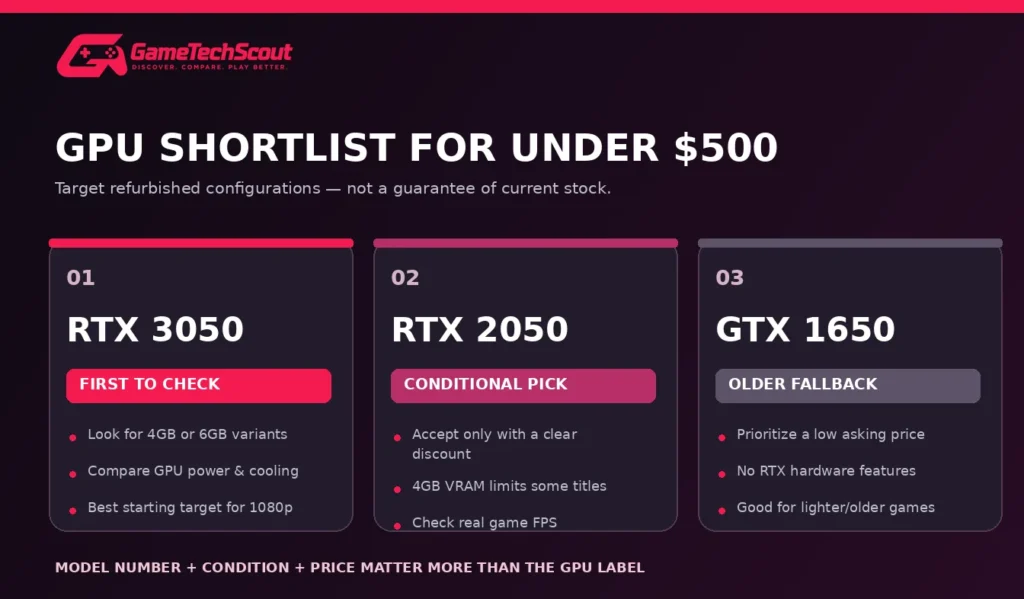
| Laptop GPU | Buying assessment | Main consideration |
|---|---|---|
| RTX 3050 | Preferred starting target | GPU power and VRAM vary |
| RTX 2050 | Consider if substantially cheaper | Limited 4GB graphics memory |
| GTX 1650 | Older budget fallback | Less performance headroom and no RTX hardware features |
NVIDIA’s official GeForce laptop specifications provide useful information about GPU features and power configurations.
Is an RTX 3050 Laptop Still Good in 2026?
It can be useful for entry-level gaming, especially when purchased second-hand at an appropriate price.
However, different RTX 3050 laptop versions have different memory capacities and power limits.
A 6GB configuration may be more desirable than a 4GB alternative when the rest of the system and price are comparable.
Should You Avoid GTX 1650 Gaming Laptops?
Not necessarily.
A well-maintained GTX 1650 laptop at a much lower price may still be worthwhile for lighter games or older titles.
The important question is whether you are paying enough less to justify the older hardware.
If a GTX 1650 laptop costs $480 while a better-condition RTX 3050 machine costs $490, the RTX option is generally more appealing.
New vs Used vs Refurbished: Which Gives You Better Value?
At the $500 limit, the condition of the laptop can affect the value of your purchase as much as its specifications.
| Condition | Main advantage | Main risk |
|---|---|---|
| New | Clearer original warranty and condition | Weak hardware at this budget |
| Open-box | Possible discount on returned stock | Accessories or condition may vary |
| Refurbished | Potential warranty and testing | Seller standards vary |
| Used | Sometimes the lowest price | Higher uncertainty and limited protection |
Is Refurbished Better Than Used?
A genuine retailer-backed refurbished program can offer more predictable protections than an informal private sale.
For example, the eBay Refurbished program describes graded conditions, eligible warranties, and return protections.
However, ordinary second-hand listings aren’t automatically part of that program.
Always confirm the exact listing’s terms.
How to Inspect a Used Gaming Laptop Before Buying
Buying second-hand requires more attention than purchasing a new computer.
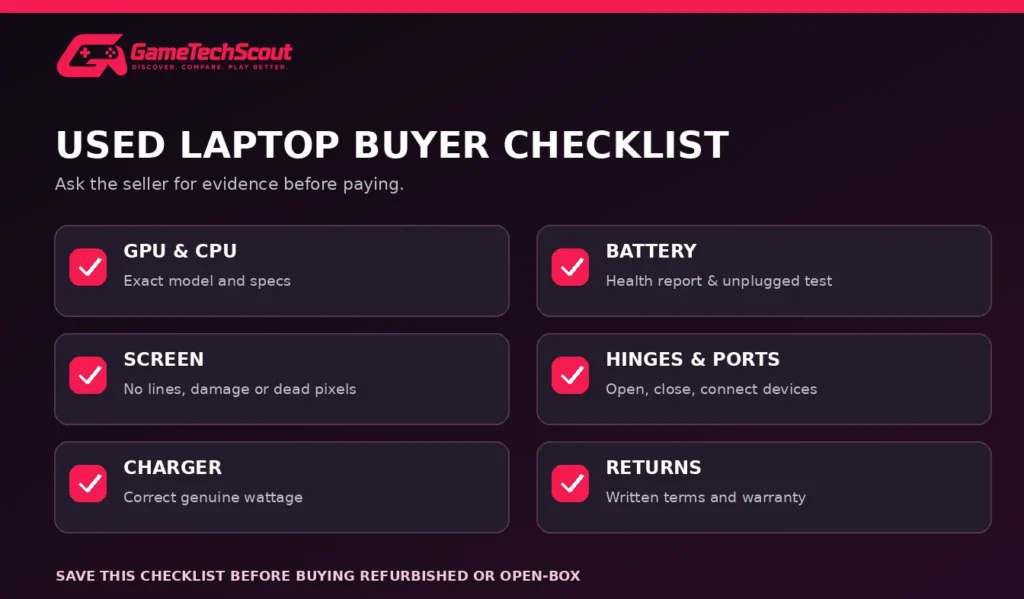
Use this checklist before paying:
- Check the exact GPU and CPU. Ask for screenshots of the hardware specifications.
- Inspect the display. Look for damaged pixels, flickering, discoloration, and excessive backlight problems.
- Check battery health. Request a battery report and confirm the laptop can run unplugged.
- Test the cooling system. Listen for unusual fan noise and ask about overheating.
- Inspect the hinges and keyboard. Check for cracks, sticking keys, and loose movement.
- Test the ports. USB, charging, audio, and display connections should work.
- Confirm the charger. Make sure the included adapter is compatible and adequately rated.
- Review return policies. Understand what happens if the laptop arrives damaged or defective.
Calculate the Real Purchase Price
Your budget should include more than the laptop listing price.
For example:
| Expense | Illustrative cost |
|---|---|
| Used gaming laptop | $425 |
| Shipping and applicable taxes | $30 |
| RAM upgrade | $40 |
| Total | $495 |
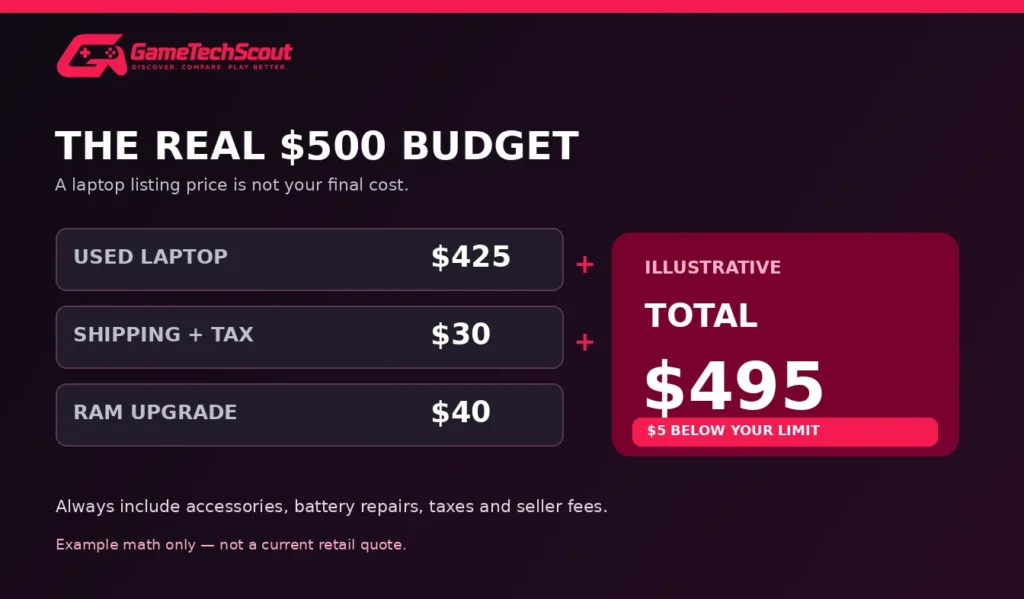
This is a calculation example, not a verified current offer. Your actual tax, shipping, and upgrade costs will differ.
When a Cheap Laptop Is No Longer a Good Deal
A laptop advertised at $450 may become a poor purchase if it needs a new battery, a replacement charger, additional RAM, and repairs.
Calculate the total cost before ordering.
If the refurbished system approaches the price of a significantly newer laptop, you may be better off increasing your budget.
Our gaming laptops under $1,000 guide explains what additional money can offer in terms of newer graphics and better configurations.
Common Mistakes When Buying a Cheap Gaming Laptop
Buying based on appearance: RGB lighting doesn’t improve gaming performance.
Ignoring graphics specifications: A newer processor with basic integrated graphics isn’t necessarily better for games than an older laptop with a dedicated GPU.
Accepting 8GB RAM without checking upgradeability: The laptop may become inconvenient for multitasking.
Trusting vague seller descriptions: Request the full model number and clear photographs.
Ignoring the battery and charger: Replacement parts can eliminate any savings.
Overpaying for obsolete hardware: Compare alternative models before committing.
Expecting premium AAA performance: A $500 laptop shouldn’t be evaluated against a $2,000 gaming system.
If your budget can stretch beyond $500, review our affordable gaming laptops comparison before making a final decision.
Frequently Asked Questions About Cheap Gaming Laptops Under $500
What Is the Best Cheap Gaming Laptop Under $500 in 2026?
A refurbished HP Victus 15 with an RTX 3050 is one of the strongest configurations worth searching for. The Lenovo IdeaPad Gaming 3 and Acer Nitro 5 are also useful alternatives when their condition and price are competitive.
Can You Get a Gaming Laptop for $500?
Yes, particularly through used, refurbished, or open-box offers. New gaming laptops with dedicated graphics are less common at this budget.
Can a $500 Gaming Laptop Run Fortnite?
Many older gaming laptops with dedicated graphics can run Fortnite. Performance depends on the GPU, processor, resolution, game mode, and settings.
Is 8GB RAM Enough for Gaming?
It can work for some lighter games, but 16GB is preferable for a more comfortable gaming and multitasking experience. Check upgrade compatibility before buying.
Is an RTX 3050 Better Than a GTX 1650?
An RTX 3050 is generally a more attractive gaming option, with additional graphics features and performance potential. However, laptop power limits and the price difference still matter.
Should You Buy a Refurbished Gaming Laptop?
It can be a good decision when the seller provides clear condition information, a useful return period, and appropriate warranty protection.
Can a Gaming Laptop Under $500 Run Modern AAA Games?
Some demanding titles can run with substantially reduced graphics settings, but smooth performance isn’t guaranteed across new games.
Is It Better to Spend $700 Instead of $500?
If you can afford it, the extra budget may open up better refurbished configurations or newer hardware.
For broader options, explore our guide to choosing good inexpensive gaming laptops.
Conclusion: Finding the Best Gaming Laptop Under $500
A $500 budget doesn’t mean you have to give up on PC gaming.
However, you’ll need to prioritize performance and condition over flashy designs.
Our first recommendation is to search for an HP Victus 15 with RTX 3050 graphics, followed by suitable Lenovo IdeaPad Gaming 3, Acer Nitro 5, ASUS TUF Gaming F15, and MSI GF63 Thin configurations.
Your best purchase will depend on the available deal, exact graphics card, RAM, battery health, and warranty.
Before committing, compare at least two listings and calculate the complete cost—including any upgrades.
If no suitable laptop appears at your price ceiling, it’s better to keep looking than spend $500 on a machine that won’t handle your favorite games.
Ready to find your gaming laptop? Check current refurbished and open-box listings, verify the exact specifications, and compare the seller’s warranty and return terms.
You can also explore GameTechScout’s Best Gaming Laptops in 2026 guide for a broader comparison.
Have you found a gaming laptop under $500? Share its model, graphics card, condition, and price in the GameTechScout comments. Your experience could help another gamer avoid a bad deal.
GameTechScout — Discover. Compare. Play Better.
Editorial note: This guide is based on official hardware specifications, retailer listings, and published buying information. GameTechScout has not personally tested each second-hand laptop. Availability, specifications, seller protections, and prices can change.