

Table of Contents
Finding the best prebuilt pc for your desk can feel daunting. Many market options use technical terms and confusing spec sheets. Our goal is to help you balance strong performance with lasting value.Your ideal setup depends on your needs, whether you want smooth 1080p titles or demanding 4K experiences. A great pc for gaming balances the processor, graphics card, and cooling system. We focus on systems with reliable performance that fit your budget. Throughout this guide, we explore the essential components behind high-quality computer gaming. You will learn to assess storage speeds, warranty coverage, and future upgrade paths. By the end, you can confidently choose a system that supports your hobby for years.

Key Takeaways
- Understand the balance between component quality and total ownership cost.
- Identify the right hardware for 1080p, 1440p, and 4K resolution targets.
- Learn how to compare processors and graphics cards effectively.
- Discover why warranty support and upgrade paths matter for long-term value.
- Gain confidence in selecting a machine that fits your specific gaming style.
The tower is only part of the total cost. Set aside money for a quality monitor, responsive keyboard, and reliable mouse. Also include the operating system if it is not included with your pc for gaming.
Step 2: Match the computer gaming experience to your display
Your monitor resolution determines how much power your hardware needs for smooth visuals. Match your hardware to your screen so you do not pay for unseen performance.
Choose 1080p, 1440p, or 4K gaming goals
Most players find 1080p ideal for competitive shooters. 1440p provides a strong balance for modern titles. For the sharpest image, 4K is the top goal for computer gaming enthusiasts.
Set frame-rate targets for competitive and story-driven games
Competitive players often want high frame rates, such as 144fps or higher, for a tactical edge. Story-driven games often look great at a steady 60fps, letting you enjoy their immersive worlds.
Step 3: Decide whether a prebuilt or custom gaming computer fits better
Your choice between a prebuilt system and a custom gaming computer depends on your hardware skills. Both options suit different skill levels and time limits.
Compare convenience, warranties, upgradeability, and assembly costs
Prebuilt systems offer the ultimate convenience and arrive ready to play. One warranty usually covers the entire machine, while building your own rig can offer better value and hardware knowledge.
Identify when a custom build may deliver better component selection
A custom gaming computer works well when you want parts that prebuilt makers might skip. If you enjoy assembly, building your own computer gaming rig gives you control over cooling, style, and future upgrades.
Choose the Best Prebuilt PC Components for Your Needs
Choosing the best prebuilt pc starts with its core parts. Each component affects game smoothness and how long the system stays useful.
Step 4: Select the right processor for gaming and everyday work
Compare the AMD Ryzen 5 7600, AMD Ryzen 7 7800X3D, and Intel Core i5-14600K
The processor is the brain of your pc for gaming. The AMD Ryzen 5 7600 offers strong value for entry-level builds. The Intel Core i5-14600K balances productivity and gaming, while the AMD Ryzen 7 7800X3D delivers top-tier frame rates through specialized cache technology.
Balance gaming performance, multitasking, heat, and platform longevity
Consider how much multitasking you do during gaming sessions. Chips with more cores handle background tasks better but often create more heat, requiring stronger cooling. A modern platform lets you upgrade the CPU without replacing the entire motherboard.
Step 5: Prioritize the graphics card before secondary features
Compare the NVIDIA GeForce RTX 4060, RTX 4070 Super, and RTX 4080 Super
The graphics card matters most for visual quality. The RTX 4060 suits 1080p gaming, while the RTX 4070 Super excels at 1440p. For 4K resolution, the RTX 4080 Super provides enough power for demanding titles.
Evaluate AMD Radeon RX 7600, RX 7800 XT, and RX 7900 XTX alternatives
AMD offers strong options with more raw performance per dollar in many cases. The RX 7600 is a solid budget choice. The RX 7800 XT and RX 7900 XTX compete with high-end NVIDIA cards in rasterization tasks.
Check ray tracing, upscaling, video memory, and creator workload support
Modern games use features such as ray tracing and AI-driven upscaling. Make sure your card has enough video memory (VRAM) for high-resolution textures. Extra VRAM helps if you edit video or create 3D renders.
Step 6: Verify memory, storage, power, and cooling
Choose 16GB or 32GB of DDR5 RAM based on current game requirements
Modern games increasingly need more memory for smooth performance. While 16GB is the current baseline, 32GB of DDR5 RAM gives more room for future games and heavy multitasking.
Look for a 1TB NVMe SSD and room for additional storage
Fast storage helps games and programs load quickly. A 1TB NVMe SSD is standard for the best prebuilt pc, but check for extra motherboard slots for future storage.
Confirm the power supply wattage, efficiency rating, and upgrade headroom
Your power supply unit (PSU) needs enough wattage for every component under full load. An 80 Plus Gold rating supports stable power delivery and reduces energy waste.
Inspect air cooling, liquid cooling, airflow, and fan placement
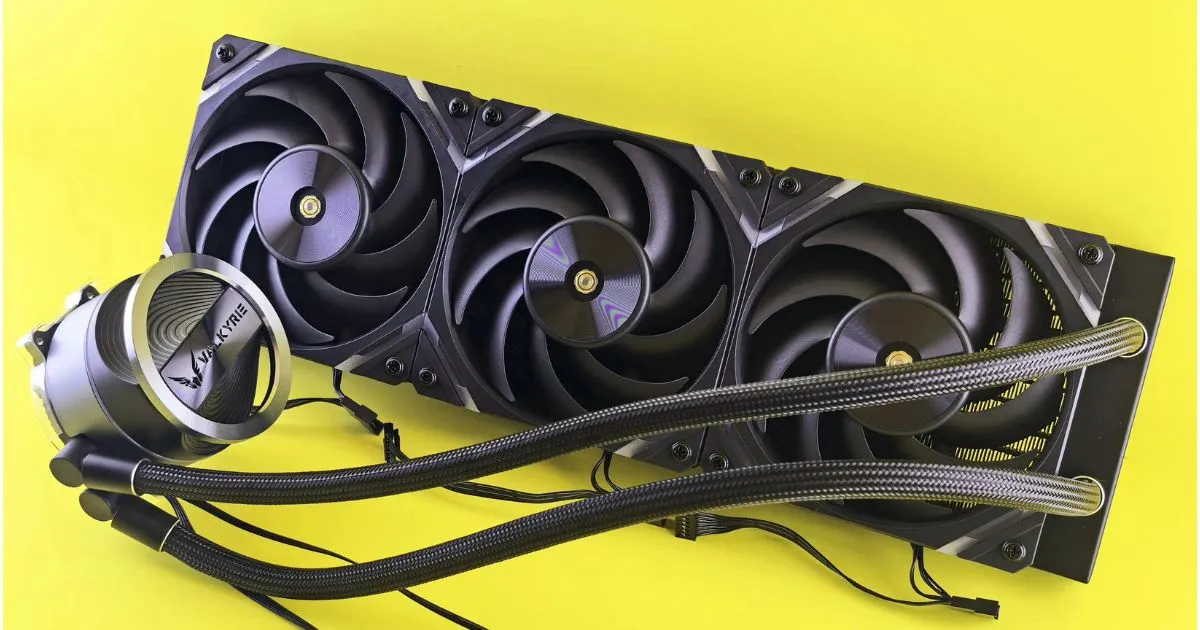
Good cooling prevents thermal throttling during intense gaming sessions. Whether you choose air cooling or an AIO liquid cooler, ensure the case has enough fans for steady airflow.
| Component | Entry-Level | Mid-Range | High-End |
|---|---|---|---|
| Processor | Ryzen 5 7600 | i5-14600K | Ryzen 7 7800X3D |
| Graphics | RTX 4060 | RTX 4070 Super | RTX 4080 Super |
| Memory | 16GB DDR5 | 32GB DDR5 | 32GB+ DDR5 |
Compare the Best Prebuilt PC Options for Performance and Value
Choosing the right gaming machine is easier when you compare the strengths and weaknesses of top-tier prebuilt options. Each system balances hardware, style, and long-term usefulness in its own way. Reviewing these five models helps you find which best prebuilt pc fits your needs.
Step 7: Evaluate the ASUS ROG G16CH for affordable 1080p gaming
Review its processor, graphics card, memory, storage, and upgrade options
The ASUS ROG G16CH suits gamers seeking reliable performance at a reasonable price. It usually includes mid-range processors and graphics cards that handle 1080p titles with ease. Standard memory and storage support most modern computer gaming libraries.
Identify its strongest use cases and potential compromises
This system works well in compact spaces with limited desk room. However, its tight internal layout may limit future installation of larger cooling solutions. It remains a solid plug-and-play choice over building a custom gaming computer.
Step 8: Consider the Lenovo Legion Tower 5i for balanced 1440p play
Assess gaming speed, cooling design, connectivity, and build quality
The Lenovo Legion Tower 5i earns praise for excellent thermal management and a clean design. It delivers enough power for high frame rates at 1440p resolution. Its sturdy build and generous ports support many peripherals.
Determine whether its configuration justifies the asking price
When comparing components and price, this model often reaches a “sweet spot” for value. It avoids unnecessary bloatware, letting you focus on computer gaming sessions. Many users find its cooling worth the investment over cheaper, hotter-running alternatives.
Step 9: Examine the HP Omen 40L for flexible midrange performance
Check component accessibility, airflow, RGB controls, and expansion support
The HP Omen 40L has a tool-less design that makes upgrades easy over time. Its airflow is generally well-optimized, keeping components cool during intense sessions. You also get robust RGB software for customizing your rig.
Compare its gaming value with similarly priced Lenovo and ASUS systems
The Omen 40L competes with other brands while offering more flexibility for future upgrades. It bridges a standard prebuilt and a custom gaming computer with many off-the-shelf parts. This makes it a smart choice for users planning to replace their graphics card in a few years.
Step 10: Assess the Alienware Aurora R16 for premium convenience
Review its compact design, acoustics, warranty options, and proprietary parts
The Alienware Aurora R16 has a sleek, futuristic look and quiet operation. Its compact design fits almost any home office setup. However, several proprietary parts can make third-party upgrades more difficult.
Decide whether the premium is worthwhile compared with a custom gaming computer
You pay for the brand, warranty, and specialized support included with this best prebuilt pc. The premium is often worthwhile if you value peace of mind and a polished look. However, hardware enthusiasts may find its proprietary design restrictive.
Step 11: Compare the Corsair Vengeance i7500 for enthusiast-level gaming
Evaluate high-end processor and graphics configurations for 4K gaming
The Corsair Vengeance i7500 is built for enthusiasts who demand top-tier performance at 4K resolution. It uses high-end components that keep your computer gaming experience smooth and visually stunning. This level of hardware rarely creates performance bottlenecks.
Consider component quality, thermal performance, and long-term upgrade value
Corsair uses high-quality, standard parts throughout the build, which provides a major advantage. This system feels closer to a high-end custom gaming computer than most prebuilt options. Its excellent thermal performance helps your investment last for many years.
| Model | Target Resolution | Upgrade Potential | Best For |
|---|---|---|---|
| ASUS ROG G16CH | 1080p | Moderate | Budget-conscious gamers |
| Lenovo Legion 5i | 1440p | Good | Balanced performance |
| HP Omen 40L | 1440p | Excellent | Future-proofing |
| Alienware Aurora R16 | 4K | Low | Premium aesthetics |
| Corsair Vengeance i7500 | 4K | High | Enthusiast power |
Check Real-World Value Before Buying a Prebuilt Gaming PC
Finding the best prebuilt pc means looking past flashy marketing. Manufacturers often highlight the CPU and GPU, but hidden parts also shape system quality.
Step 12: Compare complete specifications instead of headline components
Check the exact processor, graphics card, RAM configuration, and SSD capacity
Always verify the specific model number for every major part. A generic “RTX 4070” may perform differently because of cooling and manufacturer power limits.
Look for single-channel memory, slow storage, or cut-down motherboard features
Avoid systems with one RAM stick because single-channel memory limits bandwidth. Check whether the motherboard supports expansion or lacks basic connections, such as extra M.2 slots.
Step 13: Calculate performance per dollar
Compare benchmark results at the target resolution and frame rate
Look for independent reviews testing the specific pc for gaming at your preferred resolution. Do not rely only on manufacturer charts, which often show best-case results.
Include game bundles, discounts, warranty coverage, and included software
Calculate the total ownership cost, including bundled games and software subscriptions. A slightly more expensive system may offer better value with a longer warranty or included peripherals
Step 14: Inspect the seller, warranty, and return policy.
Step 14: Inspect the seller, warranty, and return policy
Confirm the length and terms of the manufacturer warranty
Read the fine print to learn what the warranty covers. Some companies offer on-site support, while others require you to ship the entire unit for repairs.
Review shipping damage procedures, technical support, and return windows
Make sure the seller has a clear policy for shipping damage. A reputable company provides easy access to technical support during initial setup.
Step 15: Confirm upgrade and ownership costs
Verify access to RAM slots, M.2 storage slots, and standard power connectors
A custom gaming computer is often easier to upgrade, but some prebuilt systems use proprietary parts. Check whether the power supply uses standard connectors for a future graphics card upgrade.
Budget for future upgrades, maintenance, and potential Windows licensing costs
Consider the long-term costs of keeping your machine running smoothly. Include expenses such as extra storage drives or a new Windows license when replacing the motherboard.
Step 16: Test the PC immediately after delivery
Check temperatures, fan noise, stability, and performance in several games
Run stress tests to ensure the cooling system handles heavy loads without overheating. Monitor fan noise to confirm it stays comfortable during intense gaming sessions.
Update drivers and firmware while avoiding unnecessary preinstalled software
Remove bloatware that slows down your pc for gaming. Update your GPU drivers and motherboard BIOS for stability and performance right out of the box.
Conclusion
Choosing the best prebuilt pc starts with clear gaming goals. Balance your frame-rate targets and budget for lasting satisfaction. A smart purchase matches your hardware with your favorite titles.
Finding the right pc for gaming means looking beyond marketing labels. Check the cooling system and power supply unit to protect your investment. These hidden parts affect your machine’s life during intense sessions.
Many players compare a prebuilt system with a custom gaming computer. Each option offers benefits based on your technical comfort level. A prebuilt unit works right away, while a custom build controls every internal part.
Always check the total cost of ownership before choosing a model. Review the warranty terms and return policies to protect your purchase.
Reliable support remains vital to the modern computer gaming experience. Share your favorite system configurations with friends to help them navigate their own hardware choices today.
FAQ
Is it better to buy the best prebuilt pc or build a custom gaming computer from scratch?
The choice depends on your technical comfort and time. A custom gaming computer offers total control: AMD Ryzen 7 7800X3D processor or high-end NVIDIA GeForce RTX 4080 Super. However, the best prebuilt pc options, like the Corsair Vengeance i7500, offer professional assembly, a unified warranty, and high-end computer gaming readiness.
What should I look for in a pc for gaming if I want to play at 1440p?
For balanced 1440p play, choose a best prebuilt pc with a mid-to-high-tier graphics card like the NVIDIA GeForce RTX 4070 Super or AMD Radeon RX 7800 XT. Pair it with an Intel Core i5-14600K or AMD Ryzen 5 7600 and at least 16GB of DDR5 RAM for smooth frame rates in modern titles.
How much storage is necessary for a modern computer gaming setup?
Most modern games are large, so your pc for gaming should include at least a 1TB NVMe SSD. Systems like the HP Omen 40L often provide additional M.2 slots, making later storage upgrades easy. Avoid older mechanical hard drives for your primary game library because they greatly slow loading times.
Are prebuilt systems like the Alienware Aurora R16 easy to upgrade?
It varies by brand. The Alienware Aurora R16 offers a sleek, compact design, but proprietary motherboards or power supplies can make upgrades difficult. Choose Lenovo Legion Tower 5i for custom-like best prebuilt pc upgradeability; it has standardized components and great airflow.
Which graphics card offers the best value for 1080p computer gaming?
For 1080p enthusiasts, the NVIDIA GeForce RTX 4060 and AMD Radeon RX 7600 are top value contenders. These appear in ASUS ROG G16CH, offering excellent performance for competitive titles without a costly 4K-capable pc for gaming.
Why is cooling so important when choosing a best prebuilt pc?
High-performance components like the AMD Radeon RX 7900 XTX generate significant heat. A pc for gaming with poor airflow or weak fans will “thermal throttle,” meaning it slows down to prevent damage. Check for plenty of case mesh, and consider liquid cooling for high-end CPUs like the Intel Core i9 series.
Is 32GB of RAM necessary for a custom gaming computer today?
16GB of DDR5 RAM remains the minimum; 32GB is quickly becoming recommended for a high-end best prebuilt pc. With 32GB, your computer gaming experience stays stutter-free while multitasking with Discord, Chrome, or streaming software.
1 Comment